Skip to content
Screenshot2Text

Screenshot2Text

Copy Text from Image

Sometimes the words you need are locked inside a picture: a screenshot sitting in Slack, a meme with a quote, a scanned form, a photo of a clause in a contract, or an error dialog you cannot select. Copying text from an image is the step after OCR: turn those pixels into a string, then put that string on the clipboard so you can paste it somewhere useful.

Screenshot2Text is built around that last step. After recognition you get an editable box of selectable text and a Copy button that writes to the system clipboard. Fix an obvious misread first if you want, then copy. The read happens in this tab with Tesseract.js. We do not upload the image for OCR, which matters when the screenshot includes a hostname, a customer name, or anything you would not attach to a random web form.

The copy path is most reliable on sharp, high-contrast sources: UI chrome, terminal output, printed paragraphs, and tracking numbers in a well-lit photo. Blurry phone shots and messy handwriting often need a manual pass after paste; we do not claim handwriting will copy perfectly. If Copy is blocked by a browser permission, select the text in the box and use your usual keyboard shortcut.

Drop one image or several. PDF pages work the same way. There is no charge. Drop a file below to copy text from an image here, or open the main free tool on the homepage for the same converter with the original landing copy.
Or open the main free tool

OCR runs in the browser. We don't upload your file for OCR.

Drop a screenshot, image, or PDF here

PNG, JPG, WEBP, GIF, BMP, or PDF · several files at once · tap to browse

Or paste a screenshot with Ctrl+V or ⌘V

Nothing to copy yet

What the copy button actually copies

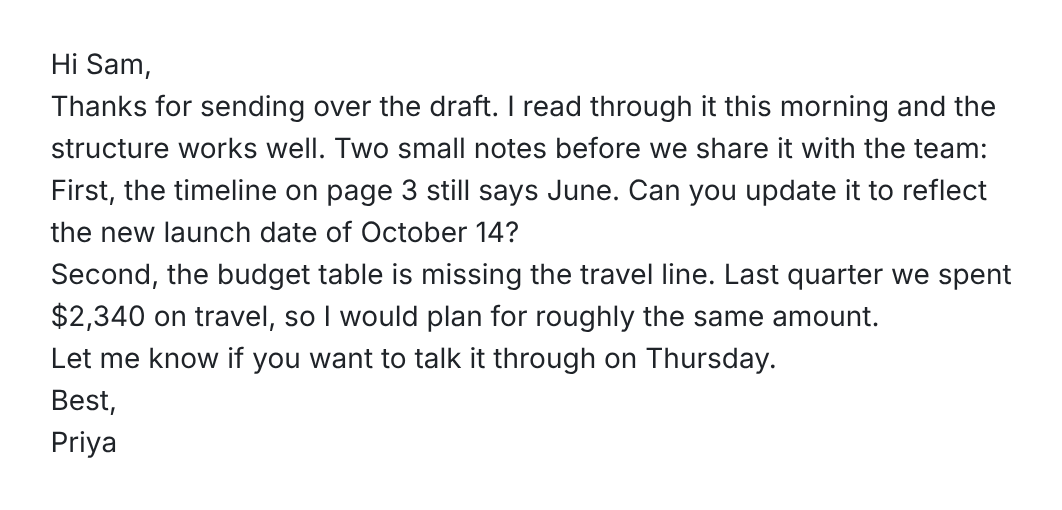
Here is a real run with para02-email, a test screenshot from our OCR accuracy test. It is a short email with line breaks where the email client wrapped the text. It reads with no errors, in 0.70 seconds in run 3 of the accuracy test.

Screenshot of a short email from Priya to Sam with notes on a draft: update the timeline on page 3 to the October 14 launch date and add a travel line of $2,340 to the budget table
Input: para02-email, a test screenshot from our accuracy set.
Text in the box after recognition
Hi Sam,
Thanks for sending over the draft. I read through it this morning and the
structure works well. Two small notes before we share it with the team:
First, the timeline on page 3 still says June. Can you update it to reflect
the new launch date of October 14?
Second, the budget table is missing the travel line. Last quarter we spent
$2,340 on travel, so I would plan for roughly the same amount.
Let me know if you want to talk it through on Thursday.
Best,
Priya

The line breaks match where the screenshot wrapped, not where the sentences end. Press Copy text and the button briefly changes to Copied. What lands on the clipboard is exactly what is in the box, including any edits you made. We checked this by reading the clipboard after the click.

To paste the text as flowing sentences, press Join lines first. The note under the box then says: Lines joined. Press Undo join to put the line breaks back. This is what Join lines gave us, and what Copy text copied after it.

After Join lines
Hi Sam, Thanks for sending over the draft. I read through it this morning and the structure works well. Two small notes before we share it with the team: First, the timeline on page 3 still says June. Can you update it to reflect the new launch date of October 14? Second, the budget table is missing the travel line. Last quarter we spent $2,340 on travel, so I would plan for roughly the same amount. Let me know if you want to talk it through on Thursday. Best, Priya

Join lines turned the whole email into one paragraph, greeting and sign-off included, because this screenshot has no blank lines between paragraphs. For a letter you may want to keep the breaks, or add blank lines where paragraphs start before you join. For a paragraph pulled from an article, joined text is usually what you want. Undo join puts the original line breaks back.

A chat screenshot, copied as is

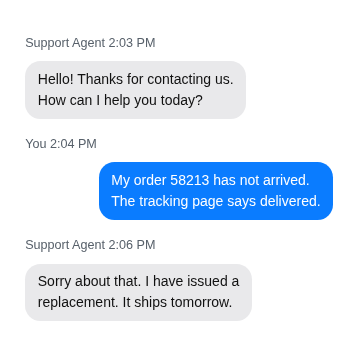
This one is chat02-support from our OCR accuracy test: a short support chat, 359 by 349 pixels. We dropped it on screenshot2text.com on October 8, 2026 and copied the text in the box as it came back.

Support chat screenshot: the agent says hello and asks how to help, the customer says order 58213 has not arrived though tracking says delivered, and the agent says a replacement ships tomorrow
Input: chat02-support, a test screenshot from our accuracy set.
Text in the box after recognition
Support Agent 2:03 PM

Hello! Thanks for contacting us.
How can I help you today?

You 2:04 PM

My order 58213 has not arrived.
The tracking page says delivered.

Support Agent 2:06 PM

Sorry about that. I have issued a
replacement. It ships tomorrow.

Every character matched the screenshot, a character error rate of 0.00%, the same as in the run 3 CSV. Each sender line, like Support Agent 2:03 PM, sits on its own line with a blank line around it, so the copied text keeps who said what. Inside each bubble, the line breaks follow the screenshot.

Because the messages are separated by blank lines, Join lines keeps each message apart and only joins the wrapped lines inside it. This is what pressing Join lines gave us on the live page.

After Join lines
Support Agent 2:03 PM

Hello! Thanks for contacting us. How can I help you today?

You 2:04 PM

My order 58213 has not arrived. The tracking page says delivered.

Support Agent 2:06 PM

Sorry about that. I have issued a replacement. It ships tomorrow.

Before you paste: what it can't read well

On October 8, 2026 we checked a few hard cases with one clean paragraph screenshot that reads with no errors, changing it one way at a time. Each version was read once on the live site. The scores and images are in the limits check CSV.

Blurry images: a 2 pixel blur pushed the character error rate to 47.81%, and a 3 pixel blur left none of the original words. If the source is soft, the copied text will be wrong too.

Steep angles: the same text tilted about 40 degrees came back at 38.41%, with most words broken.

Very small text: shrunk to 30%, with capital letters about 3.6 pixels tall, it came back at 44.47%. At 40% it was still 0.84%.

Stylized fonts and handwriting: the text set in Lobster, a script font, came back at 2.71%, with t read as l and s read as a. We have not tested real handwriting, so we have no number for it.

Dark mode: in run 3 of our accuracy test, this same support chat scored 0.00% as a light screenshot and 4.47% in dark mode.

Read the box before you press Copy text. You can fix a letter there, and the fixed text is what gets copied.

FAQ

How do I copy text out of a picture?
Drop the image, wait until the text box fills, then press Copy. That writes the current contents of the box to your clipboard so you can paste into another app. Recognition happens in this tab first, so the picture is never uploaded to get there. You can also download a .txt file when you want to keep the result.
What if the Copy button does not work?
Some browsers block clipboard writes until you interact with the page, or they deny the permission. Select the text in the box and copy with your keyboard or the context menu instead. The box is ordinary selectable text once recognition finishes, so the fallback is the same copy path you already use elsewhere.
Can I edit the text before I copy it?
Yes. The output box is editable. Correct a letter or trim extra line breaks, then copy. Both Copy and Download .txt use exactly what is in the box, edits included. We do not save those edits on a server.
Which pictures copy most reliably?
Sharp, high-contrast sources: UI chrome, terminal output, printed paragraphs, and tracking numbers in a well-lit photo. Blurry phone shots and messy handwriting often need a manual pass after paste; we do not claim handwriting will copy perfectly. Crop away status bars and keyboards when you can.
Is copy-from-image free?
Yes, and it stays free. There is no account and no charge to run OCR or use Copy. Ads on the page cover hosting. Drop one image or several; PDF pages work the same way.