Skip to content
Screenshot2Text

Screenshot2Text

PNG to Text

To convert a PNG to text, drop the PNG on this page. The text shows up in the box below, ready to edit, copy, or save as a .txt file. OCR runs in your browser and we don't upload your file. There is no account to make.

PNG is the usual format for desktop screenshots, and it is the best file to start from. It keeps every pixel, so thin fonts and punctuation stay sharp. In our test, a PNG screenshot took under a second on average once the OCR engine had loaded.

Crop to the part you need. A full desktop capture, light text on a transparent overlay, or text over a busy wallpaper can hide letters. Clear printed interface text reads best. Handwriting is weaker. JPG, WebP, and PDF files work on this same reader too.
Or open the main free tool

OCR runs in the browser. We don't upload your file for OCR.

Drop a screenshot, image, or PDF here

PNG, JPG, WEBP, GIF, BMP, or PDF · several files at once · tap to browse

Or paste a screenshot with Ctrl+V or ⌘V

Nothing to copy yet

A real run: a terminal screenshot

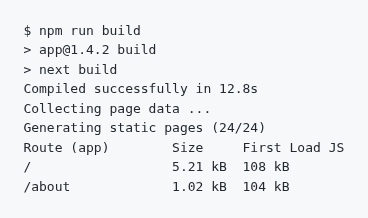
This is code03-terminal from our OCR accuracy test, a 368 by 218 pixel PNG of a build log in a monospace font. We dropped it on the live site on October 11, 2026. The output below is exactly what came back.

Terminal screenshot of npm run build: app@1.4.2 build, next build, Compiled successfully in 12.8s, Collecting page data, Generating static pages (24/24), and a route table with / at 5.21 kB and 108 kB and /about at 1.02 kB and 104 kB
Input: code03-terminal, a 368 by 218 pixel PNG screenshot.
Raw OCR output
$ npm run build
> appRl.4.2 build
> next build
Compiled successfully in 12.8s
Collecting page data ...
Generating static pages (24/24)
Route (app) Size First Load JS
5.21 kB 168 kB
/about 1.82 kB 164 kB

7 of 204 characters were wrong, a character error rate of 3.43%, the same as in run 3. Every plain word came through. The misses are the ones to check in any log: the version app@1.4.2 came back as appRl.4.2, the / at the start of the route table was dropped, and three numbers changed, 108 kB to 168 kB, 1.02 kB to 1.82 kB, and 104 kB to 164 kB. The wide column gaps were also cut to single spaces.

So read version strings, paths, and figures against the screenshot before you paste them anywhere.

How PNG did in our test

PNG was our baseline in run 3 of the OCR accuracy test, on September 25, 2026. Across 22 screenshots saved as lossless PNG, the mean character error rate (CER) was 0.65%, the median was 0.00%, and word recall was 96.82%. That was the lowest mean of the eight versions we tested. Each PNG took 0.71 seconds on average to read. The figures come from the run 3 CSV.

12 of the 22 PNG files read with no errors at all. The other 10 are listed below, so you can see where even a clean file needs a second look.

The 10 PNG screenshots that had at least one error in run 3, September 25, 2026
ScreenshotKindWrong charactersCER
code03-terminalCode7 of 2043.43%
num01-receiptReceipt7 of 2183.21%
code04-jsonCode4 of 1382.90%
code01-jsCode4 of 2221.80%
ui04-accountApp screen1 of 1380.72%
ui05-formApp screen1 of 1800.56%
num02-invoiceInvoice1 of 2090.48%
para05-policyParagraph2 of 4340.46%
ui01-settingsApp screen1 of 2570.39%
ui03-errorApp screen1 of 2800.36%

Code and receipts carry most of the errors: quotes, brackets, and backticks in code, and digits and units on the receipt. For comparison, the same 22 screenshots had a mean CER of 0.93% as WebP at quality 75, 2.17% as JPEG at quality 30, and 1.77% in dark mode. A PNG is the best file to start from, and the symbols are still worth checking.

FAQ

Can I convert a PNG to text?
Yes. Drop a .png file on this page. Recognition runs in the browser with open-source OCR and the text appears in the box below the drop zone, where you can edit it and then copy or save a .txt file. JPG and WebP work on the same reader if that is what you have.
Should I use PNG instead of JPG?
If you still have a PNG screenshot, use that. Lossless pixels keep thin fonts and interface chrome sharper than a re-saved JPEG. Camera JPEGs are fine when the type is large and well lit, and this reader also accepts JPG and WebP. Dedicated JPG and WebP entrances live at /jpg-to-text and /webp-to-text.
Why is text missing from my PNG?
A full-desktop capture, low-contrast type on a busy wallpaper, or very light type on a transparent overlay can hide letters. Crop to the paragraph or dialog you need. Huge retina captures of an entire desktop also slow the tab because recognition runs on your device. Expect gaps on decorative or handwritten type.
Does PNG to text stay on my device?
Yes. We do not upload the PNG for OCR and we do not store the image or the extracted text on a server. The first run may fetch small recognition files to your device; those requests do not include your screenshot. Closing the tab clears the working copy.
Is PNG to text free?
Yes, and it stays free. Every feature works without an account. Ads on the page cover hosting. Drop one PNG or several. PDFs work on this same reader if you have those instead.