Guide
Copy text from a receipt screenshot
Receipts are sensitive and often not selectable. Crop the slip, read it on your device, then check totals and tax lines before you paste them anywhere.
Updated September 25, 2026
Why receipt screenshots need care
Expense apps, email forwards, and chat threads often show a receipt only as an image. Vendor names, dates, card tails, and totals are not selectable.
Those fields are sensitive. Prefer a path where recognition stays on your device instead of shipping the slip to a random upload converter.
Screenshot2Text runs OCR in your browser tab. Crop, read, proofread. Ads on the homepage do not receive the image.
Crop the slip, not the whole desk
Frame the receipt or invoice block. Cut out pockets, table clutter, browser chrome, and giant empty margins. Less background means fewer junk tokens.
Phone photos of paper slips need flat lighting and a square angle. Glare on thermal paper wipes out thin totals. Retake if you cannot read the amount with your own eyes.
Prefer PNG when you still control the save. Chat recompression softens decimal points and small tax lines first.
Run local OCR in the browser
Open the homepage. Drop the crop or paste from the clipboard. Pick the language that matches the printed slip. Wait for the engine if this profile is cold.
Edit in the box. Copy the vendor line, date, and totals you verified. Download .txt if you want a small local note before you enter an expense form.
Recognition stays in the tab. That is the point for receipts: convenient OCR without an upload-first converter.
Proofread money fields like a human
OCR confuses 3/8, 5/6, and 1/7 on faint thermal print. Always compare subtotal, tax, tip, and grand total to the image before you submit an expense.
Currency symbols and thin decimal points drop under compression. If the slip shows $12.40 and the box shows 1240, fix it by eye.
Card masks, billing addresses, and QR payloads may appear in the text box. Delete what you do not need before you paste into chat or email.
Worked example: a grocery receipt
This is num01-receipt, a receipt screenshot from our OCR accuracy test, 359 by 400 pixels, with five line items, a subtotal, tax, a total, and a card number. We ran it on a local production build of the current site code in headless Chromium, and the output below is exactly what came back.
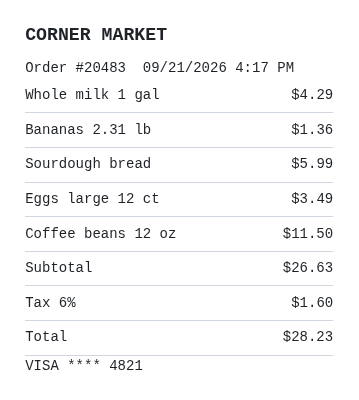
CORNER MARKET

Order #20483 09/21/2026 4:17 PM

whole milk 1 gal $4.29

Bananas 2.31 1b $1.36

Sourdough bread $5.99

Eggs large 12 ct $3.49

Coffee beans 12 oz $11.56

Subtotal - $26.63

Tax 6% $1.60

Total $28.23

VISA **** 48210.
Five fixes, and one of them is money:
Coffee beans $11.56 should be $11.50. This is the one that matters. A quick way to catch it: add the line items. With $11.56 they come to $26.69, but the receipt's own subtotal says $26.63. With $11.50 they add up exactly.
VISA **** 48210. should be 4821. Extra characters crept in after the last digit of the card.
Bananas 2.31 1b should be 2.31 lb, a lowercase L read as the digit 1.
Subtotal - has a stray dash after it. Delete it.
whole milk should start with a capital W. That one is cosmetic.
The order number, date, time, tax, and total were all right. This receipt scored a character error rate of 3.21% in run 3 of the accuracy test, dated September 25, 2026, higher than the 0.92% average for the four receipts, invoices, and price lists as PNG (from the run 3 CSV). Always check totals against the line items before you file an expense.
Paper, PDF invoices, and phone captures
Paper receipts: shoot sharp, crop tight, avoid curl shadows. Faded thermal ink is a hard fail; a clearer retake beats any setting toggle.
PDF invoices: if the PDF already has a text layer, select that text in a reader first. Use OCR only for scanned pages that are truly pixels.
Phone screenshots of an on-screen receipt follow the phone-capture guide: transfer a clean file, prefer PNG, and watch dark themes.
Honest limits and product notes
You get plain text, not a bookkeeping import with categorized line items.
Handwriting on a signed check image, severe crumple, and holographic stickers still break OCR. Retype the few critical figures when the slip is a mess.
Do not email receipt images to hello@screenshot2text.com. Contact is for product feedback with a URL, not document drops.